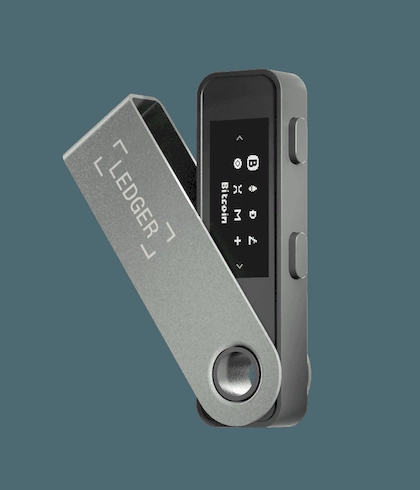
Ledger Nano S Plus™ (Specs / Interface / Compatibility)

Ledger Nano S Plus™ (Specs / Interface / Compatibility)

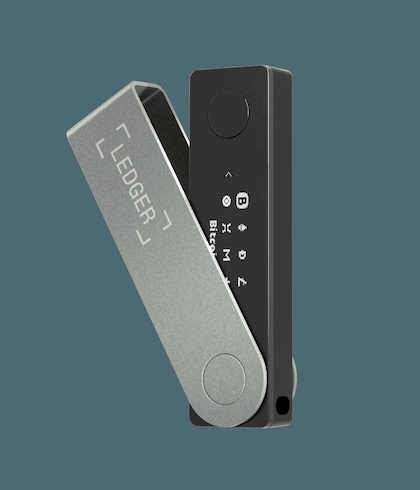
This page summarizes the key points and notes for the Ledger Nano S Plus™ (specs / interface / compatibility), covering core background, operational flow and safe-use guidance, helping users understand the relevant information and avoid common pitfalls. Content is for reference only; the official documentation is authoritative.

  • USB-C only — simple and reliable
  • CC EAL6+ certified Secure Element
  • Best entry-level Ledger hardware wallet
Contact us for pricing 699
Factory-Direct Ledger
Privacy-First Shipping
Chinese & English Support

Variants & Options

Standard

Choose a variant

Specifications

Connectivity: USB Type-C (desktop and Android)
Desktop system requirements: 64-bit Windows/macOS/Ubuntu (verify per official version requirements)
Mobile system requirements: iOS/Android support follows the official documentation; note the current page flags "iOS not compatible" — verify against the current version before go-live and hardcode on the page
Interaction and display: navigation and confirmation via on-device buttons; monochrome OLED (128×64)
Dimensions & weight: approx. 62.4×17.4×8.2mm, approx. 21g
Security: Secure Element chip; CC EAL6+ certification; Ledger OS

Authenticity Verification

Initialization and recovery information must be done and held by you — no photos, no uploads, no sharing
Before any authorization/transfer confirmation, first check the fields on the device screen
For compatibility issues, check the official system requirements first to avoid a "system mismatch" scenario

Use Cases

Desktop-first management
Android device usage via USB
Stable everyday setup / backup option

Service Scope

Personal use / Long-term holding / Backup
Long-term use

Privacy

Local confirmation + Offline storage

Overview

Overview

The Ledger Nano S Plus™ focuses on "USB connectivity + on-device confirmation" as its primary usage mode. It suits users who mostly manage from a desktop while still needing USB connectivity on Android. Positioning-wise it leans toward "stable day-to-day use and a backup option."

Connectivity & Compatibility

  • Connectivity: USB Type-C (desktops and Android devices).

  • Desktop system requirements: 64-bit Windows/macOS/Ubuntu (check the official version requirements).

  • Mobile system requirements: iOS/Android support follows the official documentation; note that the page currently flags "iOS not compatible" — before go-live, verify once more against the current version and hardcode it to the page.

Interaction & Display

Navigation and confirmation are done with on-device buttons; the screen is monochrome OLED (128×64). For critical operations, verify against the information shown on the device screen.

Dimensions & Weight

About 62.4×17.4×8.2mm, weighing roughly 21g — easy to carry or keep as a backup device.

Safety Reminders

  • Initialization and recovery-phrase custody must be done and held by you in person — no photos, no uploads, no sharing.

  • Before any authorization/transfer confirmation, verify the fields on the device screen first.

  • For compatibility issues, check the official system requirements and connectivity spec first to avoid a "system mismatch making the device unusable" scenario.

Standing disclaimer: this page is provided for product information and usage reminders only and does not constitute any commitment or recommendation; please choose rationally based on your own needs and pay attention to information security.

(Product official spec source: Ledger)
FAQ

Ready to Order Factory-Direct Ledger?

Shop Ledger through a Ledger authorized channel with English & Chinese support, discreet shipping and localized RMA coordination.

Support